WhatsApp COD confirmation can make Cash on Delivery far safer for Shopify brands. COD makes it easier for people to place an order, but it can also create delivery challenges for e-commerce businesses.
A COD order may be genuine, but the person may not be expecting the delivery on a particular day. They could be away from home, unavailable to receive the package or simply not prepared to make the payment when the delivery agent arrives.
The result can be a failed delivery and eventually a Return to Origin (RTO).
For Shopify brands, WhatsApp automation can help address this problem before the delivery attempt happens.
By using Shopify delivery events to trigger WhatsApp messages, businesses can give COD buyers advance notice on the morning of delivery. They can confirm whether they will be available or choose to reschedule.
Why Do COD Orders Turn into RTOs?
A COD order does not always fail because the buyer has changed their mind.
Sometimes, the buyer isn’t available when the delivery agent arrives.
For example, someone places a COD order on Monday. The order reaches their local delivery centre on Thursday and is scheduled for delivery that day.
The buyer may not have expected the delivery on Thursday.
They could be:
- At work
- Travelling
- Away from home
- Unavailable to answer the delivery call
- Without the required COD payment ready
The delivery agent attempts the delivery, but the package cannot be handed over.
If the order cannot be delivered after the applicable delivery attempts, it may eventually be returned to the seller.
This makes delivery day communication an important part of reducing avoidable COD RTOs.
How WhatsApp COD Confirmation Works on Shopify
The idea is simple: use Shopify order events to trigger WhatsApp messages at the right stage of delivery.
Instead of waiting until the delivery agent arrives, the business contacts the buyer earlier in the day.
The workflow has two important communication points.
Send a Message on the Morning of Delivery
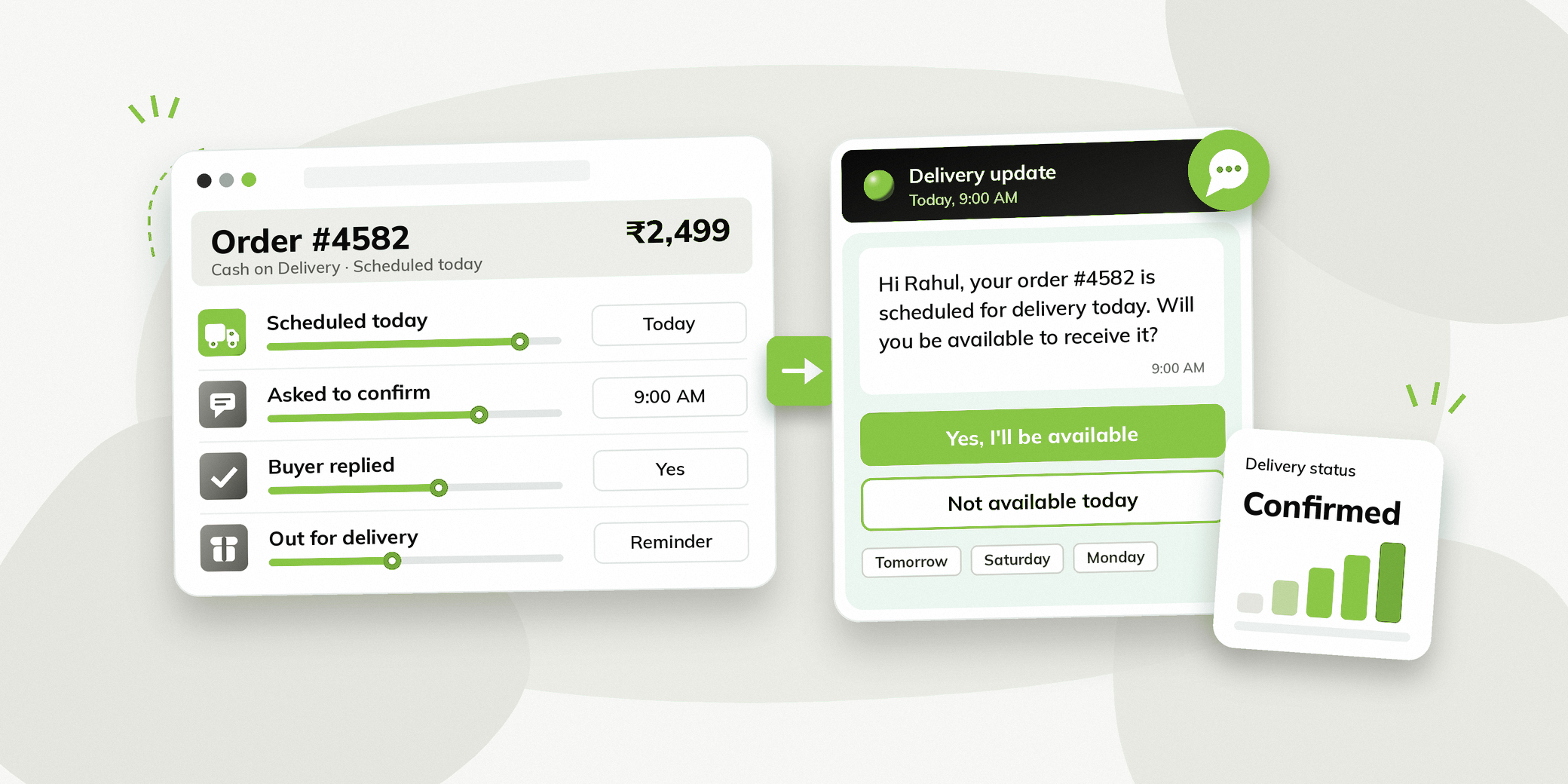
When Shopify indicates that a COD order is scheduled for delivery that day, a WhatsApp message can be sent to the buyer.
Hi Rahul, your order #4582 is scheduled for delivery today. Will you be available to receive it?
Not available today
Thanks for updating, please reschedule the delivery.
The buyer gets advance notice and can tell the business whether they will be available.
Reschedule If the Buyer Is Unavailable
If the buyer selects Not available today, the workflow can take them through a rescheduling journey.
They can be shown available dates and select a more suitable delivery date.
This gives the buyer an alternative instead of simply missing the delivery.
Send a Reminder When the Order Is Out for Delivery
For buyers who confirmed that they will be available, another WhatsApp message can be triggered when the order status changes to Out for Delivery.
For example:
Your order is out for delivery today. Please be available to receive it and keep ₹2,499 ready for COD payment.
This second message acts as a final reminder closer to the actual delivery attempt.
Why Send the First Message in the Morning?
Timing is important.
A message sent only when the delivery agent reaches the buyer’s location may be too late.
The buyer may already be at work, travelling, or away from home.
Sending the message on the morning of the scheduled delivery day gives the buyer time to plan.
If they are unavailable, they can communicate that before the delivery attempt.
If they are available, they know to expect the delivery.
The objective is not simply to remind the buyer that an order exists. It is to give them enough notice to be prepared for the delivery.
What Should the WhatsApp COD Confirmation Message Include?
The first message should be short and action focused.
Mention That the Order Is Arriving Today
Make sure that the order is scheduled for delivery that day.
Ask About Availability
The main question should be whether the buyer will be available to receive the order.
Give Two Clear Options
The buyer should be able to select:
Button 1: Yes, I’ll be available
Button 2: Not available today
The second option should lead directly into the rescheduling flow.
There is no need to make the buyer type a response or explain why they are unavailable.
What Happens When a Buyer Is Not Available?
A buyer selecting Not available today should not simply end the conversation.
The WhatsApp flow can continue with rescheduling.
Once the buyer selects a date, the relevant information can be passed back to the business system for the next step.
This creates a better experience for the buyer while helping the business avoid an unnecessary delivery attempt. A WhatsApp chatbot workflow can handle the whole exchange without manual effort.
How Shopify Events Trigger WhatsApp Messages
The automation can be based on events coming from the Shopify website and order system.
For example:
| Shopify Event | WhatsApp Action |
|---|---|
| COD order scheduled for delivery | Ask buyer to confirm availability |
| Buyer says unavailable | Start rescheduling flow |
| Buyer confirms availability | Wait for Out for Delivery event |
| Order is Out for Delivery | Send delivery reminder |
| Buyer needs help | Connect with the team |
This is what makes the workflow trigger-based WhatsApp automation.
The business does not need to manually identify every COD order and contact each buyer. If you want to go deeper, see our guide to Shopify WhatsApp automation.
How This Can Help Reduce RTO
The purpose of this workflow is to address one specific reason for failed COD deliveries: the buyer is unavailable when the delivery is attempted.
The morning confirmation gives the buyer an opportunity to:
- Know that the order is arriving that day
- Confirm that they will be available
- Tell the business if they are unavailable
- Choose another delivery date
The Out for Delivery reminder provides another prompt closer to the delivery attempt.
This can help businesses reduce avoidable failed delivery attempts and potentially lower RTO.
However, RTO can happen for many reasons. WhatsApp confirmation should therefore be treated as one part of a broader RTO reduction strategy, rather than a guarantee of lower RTO.
How Vezly Helps Automate COD Confirmation on Shopify
With Vezly, Shopify events can be connected to WhatsApp workflows. It is built for WhatsApp automation for Shopify stores.
A business can create a workflow around its COD delivery process.
For example, when an order is scheduled for delivery, Vezly can trigger a WhatsApp confirmation message.
The buyer’s response can then determine what happens next.
If the buyer confirms availability, the workflow can wait for the Out for Delivery event and send the next reminder.
If the buyer is unavailable, the workflow can take them through rescheduling.
With Vezly, the information collected during the conversation can also be pushed into connected business systems so the team can continue the process.
Best Practices for WhatsApp COD Confirmation
Contact Buyers Before the Delivery Attempt
The first message should reach the buyer early enough to give them time to plan.
Keep the Confirmation Simple
Ask one clear question and provide clear response options.
Make Rescheduling Easy
If someone is unavailable, give them a straightforward way to choose another delivery date.
Send a Second Reminder
For buyers who confirm availability, use the Out for Delivery event to send a shorter reminder.
Mention the COD Amount
The final reminder can mention the amount the buyer needs to keep ready for payment.
Keep Human Support Available
Some buyers may have questions about their order or delivery. Give them a way to connect with the team when needed.
Other Shopify Events You Can Use for WhatsApp Automation
The same event-based approach can be used beyond COD confirmation.
Order Confirmation
Send a WhatsApp confirmation when an order is placed. See how WhatsApp order confirmation messages work.
Shipping Updates
Keep buyers informed when their order is shipped.
Out for Delivery
Send a reminder when the order is with the delivery agent.
Delivery Confirmation
Send a message after the order has been delivered.
Post Purchase Communication
Follow up after delivery based on the business’s requirements.
The exact workflow depends on the Shopify events available and the communication the business wants to automate.
Final Thoughts
A COD order can be genuine and still become an RTO simply because the buyer was not available when the delivery agent arrived.
The problem is often not the buyer’s intent. It is timing and preparedness.
A WhatsApp COD confirmation workflow gives the buyer advance notice on the morning of the scheduled delivery day. They can confirm that they will be available or choose another delivery date.
For buyers who confirm availability, an additional WhatsApp message can be triggered when the order is Out for Delivery, reminding them to be available and keep the COD amount ready.
Morning confirmation. Easy rescheduling. Out for Delivery reminder.
For Shopify brands, this creates a practical way to use trigger based WhatsApp automation to reduce avoidable delivery failures and improve the COD delivery experience.
With Vezly, Shopify events can trigger these WhatsApp workflows, while customer responses can be used to determine the next action and push information into connected business systems. See how Vezly automates COD confirmation.
FAQs
What is WhatsApp COD confirmation for Shopify?
It is a WhatsApp workflow that contacts a COD buyer before delivery and asks whether they will be available to receive the order.
What if the customer is not available?
The customer can select Not available today and enter a rescheduling flow to choose a more suitable delivery date.
Should I send another WhatsApp message when the order is Out for Delivery?
Yes. A shorter reminder can be triggered when the order becomes Out for Delivery, reminding the buyer to be available and keeping the COD payment ready.
Can Shopify trigger WhatsApp messages?
Yes. Shopify events can be connected to WhatsApp automation, so specific events can trigger relevant messages.
Can Vezly connect Shopify events with WhatsApp?
Yes. Vezly can use Shopify events to trigger WhatsApp workflows for COD confirmation, delivery reminders and other customer communication.
Can WhatsApp COD confirmation reduce RTO?
It can help address avoidable failed deliveries caused by buyers being unavailable. However, RTO has multiple causes, so the overall impact depends on the business’s delivery process and customer behaviour.